
Guides desk
How to make a talking head video
Six of the ten results for this are video, and you cannot pause one to re-read a number. Under an hour of setup, written down: this is the tab you open next.
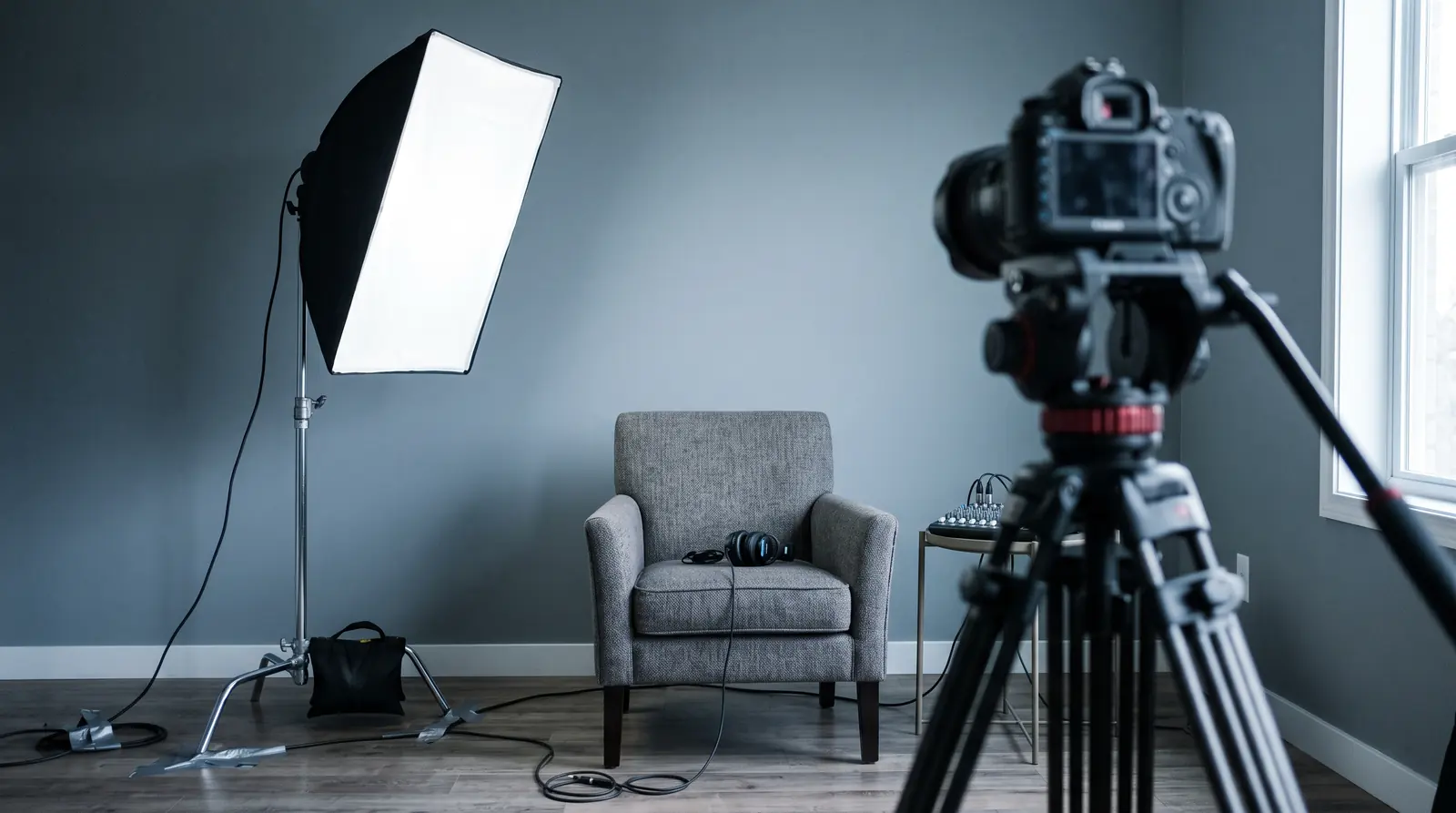
The short answer
How to make a talking head video, in under an hour: set the eyeline, frame chest up with the eyes a third of the way down, put one soft light 45 degrees off the lens, and get a microphone six inches from the mouth.
Three of those four decisions cost nothing at all, and the fourth is the one viewers actually notice.[2]
How to make a talking head video: the four decisions
Order matters, because each decision constrains the next. Choosing the light before the eyeline means moving the light again. The rest of the guides desk covers what the format is for; this page covers making one.
What to settle before anything is switched on
- Eyeline Into the lens for address, slightly off it for interview. This decides how the whole piece reads and it is the only decision you cannot fix in the edit.
- Framing Chest up, eyes a third of the way down the frame, lens at eye level. Closer than instinct suggests, and identical between takes.
- Light One soft source, about 45 degrees off the lens axis, slightly above eye level, as large and close as the room allows. A window does all three for free.
- Sound Get the microphone close. Six inches beats six hundred dollars, and this is the one viewers notice. 6 in
Eyeline: the decision that costs nothing
Look into the lens and the piece reads as address. Look slightly off it and the same footage reads as interview, with the viewer watching a conversation rather than being spoken to.
Audiences read that difference instantly without being able to name it. A testimonial framed as address feels like an advertisement, and an announcement framed as interview feels evasive.
Reading a script without looking like it
A teleprompter app on a phone or tablet, placed as close to the lens as it will physically go. The giveaway is horizontal distance: eyes tracking sideways read as reading, eyes tracking vertically barely register.
- Under about ten degrees off the lens axis and almost nobody notices.
- Bullet points beat a full script for most people, because a memorized sentence read badly is worse than an unpolished sentence delivered.
Framing: the numbers
Talking head video framing is a medium close-up: the bottom of frame around mid-chest, a little headroom above the hair, and the eyes about a third of the way down. That last one is the rule of thirds applied to a face and it does most of the work.
The framing, as four numbers
Two things go wrong reliably. Too much headroom, which leaves the subject sitting at the bottom of an empty frame, and a bottom edge that cuts at a joint, which reads as an accident even to people who cannot say why.
Consistency between takes matters more than perfection within one. A frame that shifts between cuts is the most visible amateur tell in the format.
What is the best camera for talking head videos
The one you already own, used at the right distance. This, and the related question of the best lens for talking head video, is what the video results spend the most time on, and it is the least important of the four decisions.
Focal length, and the distortion nobody explains
A wide lens close to a face enlarges whatever is nearest the camera, which is the nose, and shrinks whatever is furthest, which is the ears. That is why a phone held at arm's length is unflattering and the same phone across the room is not.
- Step back and zoom in, or use a longer lens, and the face flattens out to something the subject recognizes.
- The trade is room: a longer lens needs distance, which is why small rooms produce wide-lens video.
No specific model is recommended here. The physics ages slowly and product names age fast, and this desk earns no commission on either.
Light: one source, three positions
One light, placed properly, beats three placed badly. The three conditions are angle, height and size, and a window satisfies all three at no cost.
- Angle: about 45 degrees off the lens axis. Straight on flattens the face, and 90 degrees makes half of it disappear.
- Height: slightly above eye level, so the shadows fall where a face expects them. Below eye level is the horror-film direction.
- Size: as large and as close as the room allows. A big soft source wraps around a face; a small hard one carves it.
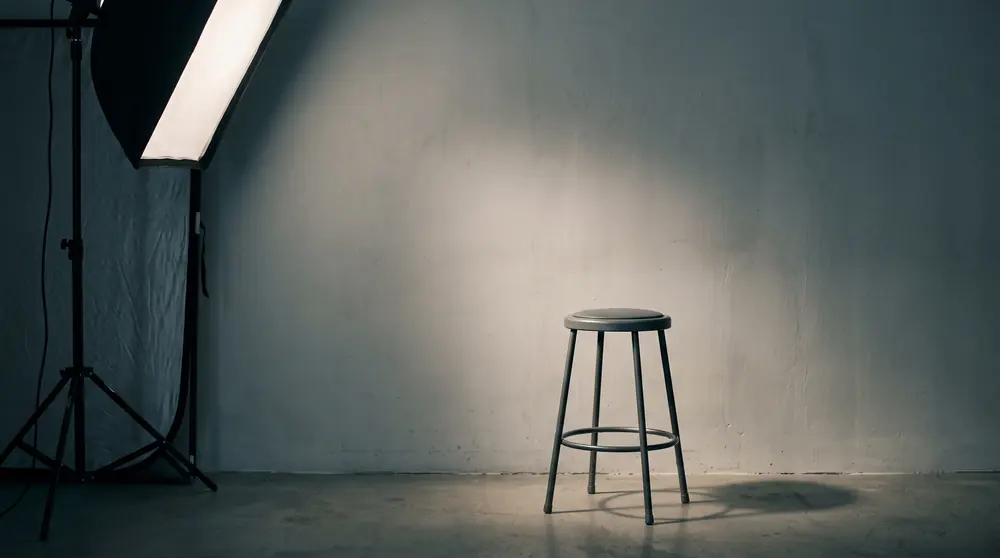
What one light does and a second one fixes
A single key leaves one side of the face in shadow, which is usually good and occasionally too much. A fill light, at half the strength on the opposite side, softens it.
A white wall or a sheet of foam board does the same job for nothing by bouncing the key back. Also set white balance deliberately, because mixing daylight and a warm bulb produces skin that reads as neither.
Sound: the part viewers actually notice
Distance beats price, and it is not close. A modest clip-on microphone six inches from a mouth will outperform an expensive one on a desk two feet away, every time.
Viewers forgive a soft picture readily and forgive bad audio never. If there is one thing to spend attention on in this list, it is this one.
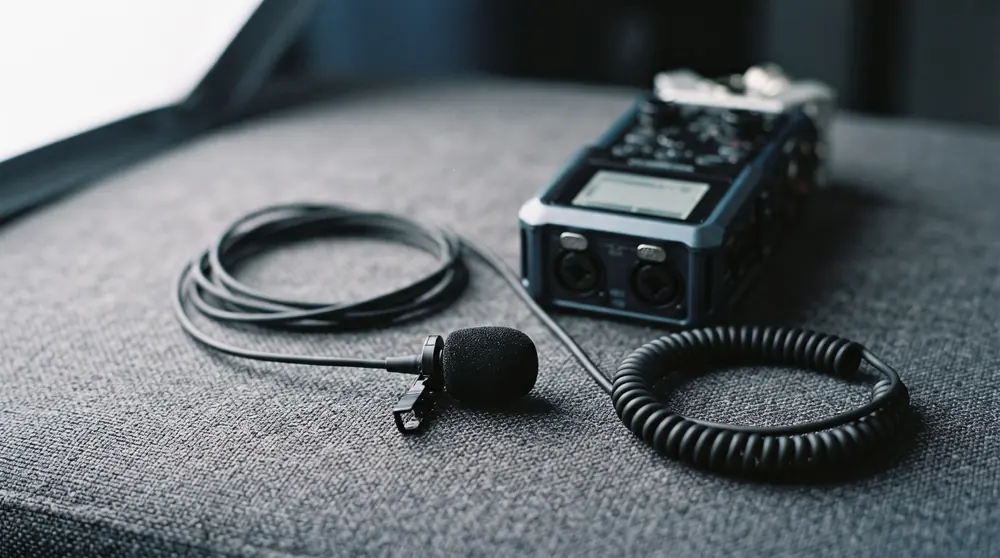
What to clip a lavalier microphone to, and where
A lavalier microphone goes on the sternum, roughly a hand's width below the chin, clipped to something that will not move. Collars and lapels rustle; a firm shirt placket does not.
- Run the cable inside the shirt so it cannot swing against fabric.
- Record a test with the subject turning their head, because a mic that sounds perfect facing forward can vanish in profile.
If you have no clip-on at all, a phone recording audio in a shirt pocket beats a camera microphone across a room. That is how much distance matters relative to everything else.
Where to shoot it
A corner rather than the middle of a room, because parallel bare walls are what produce echo. Soft furnishing helps most placed behind the camera, where the voice is heading, rather than behind the subject.
Record thirty seconds of room tone before you pack up: the room doing nothing, with nobody talking. An editor uses it to patch gaps and smooth cuts, and not having it can cost an hour.
The talking head video setup, step by step
A talking head video setup is worth building in an order that avoids re-shoots. Frame and light before the subject sits down, because adjusting either afterwards means starting the take again.
- Confirm the frame, the light and the sound with a ten-second test recording, watched back.
- Record room tone at the end, while everything is still in position.
- Do not move the microphone between takes, ever.
How to make talking head videos more engaging
The frame does not change, so attention decays. That is structural rather than a failure of the speaker, and there are exactly two conventional remedies.
- Cut away to b-roll. Reliable, and it requires having shot or licensed the footage.
- Cut within the shot. The jump cut removes every pause and keeps the frame. It costs nothing and it is why short-form video looks the way it does.
The script problem nobody edits their way out of
Most dull talking heads are dull in the first fifteen seconds, before any editing decision has been made. One idea per piece, stated early, is the whole technique.
Length is a symptom rather than a cause. A tight six-minute piece holds attention and a padded ninety-second one does not, and no amount of cutting rescues a piece that had nothing to say.
How to do a talking head video on TikTok
The same four decisions, reframed vertically. The subject sits higher in the frame because the caption and the interface occupy the lower third.
Captions are not optional, the pace is faster than it feels natural to speak, and the aspect ratio is the only rule that actually changed.
How to create a talking head video in CapCut
Four operations, and they are the same four in any editor: trim the top, cut the pauses, add captions, correct the color.
Auto-captions need a proofread rather than a glance, because a mis-transcribed word sits on screen for its full duration. This desk names the operations rather than the menus, because editors rearrange their menus every release and the operations have not changed in twenty years.
How to make talking head videos with AI
Write the script, choose a presenter, choose a voice, render. The presenter is either a stock avatar the platform supplies or a personal avatar trained on footage of a specific real person.
What a finished minute costs on the published plans
The full ladders, with the license terms and what happens to an unused allowance, are on the pricing desk.
What an AI avatar platform actually replaces
An AI avatar platform replaces the camera, the light, the room and the person's availability. It does not replace the four decisions: framing, eyeline and lighting are baked into the avatar you pick rather than removed from the process.
The economics are also different in one specific way. Filming a second version means booking the person again; rendering a second version means changing the script and pressing the button, and that is what the derived cost per finished minute above is measuring.
What the AI route does not remove
The script, which is the part that decides whether anyone watches. Also the judgement about whether the piece is worth making, which no tool has ever supplied.
If the presenter is a real person, their written consent comes before the training footage rather than after it. That is a legal question rather than a production one and it has its own guide.
What does a talking head video look like
A news anchor reading to camera is the purest example, and the definitional guide covers where the format came from. A video testimonial is the same shot with the eyeline moved off the lens, and most corporate onboarding is the same shot again with worse lighting.
This desk does not host or license video, so those are described rather than embedded. Watch any of them with the four decisions in mind and the choices become obvious.
The background, and the assets nobody plans for
A background is a decision rather than whatever happens to be behind you. Depth helps: a wall directly behind the head is the least interesting option available, and stepping the subject forward a couple of feet gives the light somewhere to fall off.
- Anything with text on it will be read by every viewer instead of listening to you.
- A plain wall is fine. A plain wall with one out-of-focus object is better.
Plan the assets before the shoot rather than after. Creating b-roll clips, a title card and an end frame takes minutes while everything is still set up and hours once it is packed away, which is the most common way an effective piece becomes a half-finished one.
Tips for beginners, and the ones worth ignoring
Most beginner advice on this topic is about equipment, and almost none of the interesting difference comes from equipment. Some studio-grade gear in a bad position looks worse than a phone in a good one.
- Worth doing: watch back ten seconds before committing to a take.
- Worth ignoring: any list that opens with what to buy rather than where to put it.
Mistakes that cost a re-shoot
Four, and all four are inexpensive to prevent and expensive to discover in the edit. Most of the tips on how to make a talking head video skip them, because they are boring until the day one costs you an afternoon.
- Framing that drifts between takes, so cuts jump.
- A microphone that moved, so the voice changes level mid-piece.
- A window that changed, so the color temperature shifts across the recording.
- No room tone, so every gap has to be filled with something that does not match.
A checklist for the take
Six things, confirmed on a ten-second test recording before the real one.
- Eyeline decided and the prompter close to the lens.
- Frame chest up, eyes on the upper third, lens at eye level.
- Key light 45 degrees off, slightly high, soft.
- Microphone within about six inches and not moving.
- White balance set rather than automatic.
- Room tone recorded, or a note to record it.
How we wrote this
The camera, light and sound practice here is standard production convention rather than any vendor's advice, because no vendor owns the physics. The editorial desk here shot no footage for this page and has not run the AI tools it prices.
The crawl for this term measured only 2 of 10 competitors, below its own floor of three, because six results are video. That shortfall is recorded in the brief rather than papered over. What counts as a checked figure here.
What demand for this term is doing
Roughly 40 searches a month in the US at a keyword difficulty of 0.[1] Six of the ten results are video and only two yielded written prose at all.
That composition is the opportunity rather than the obstacle. People watch a tutorial and then go looking for the numbers, and at the moment there is very little written down for them to find.
Four video interviews is not identity verification
A documented first-hand account, not a market pattern. KnowBe4's own security operations team and its CEO, Stu Sjouwerman, describing an incident at their company on 15 July 2024: suspicious activity detected at 21:55 EST on the new hire's workstation, the device contained by about 22:20 EST, and the findings corroborated with Mandiant and the FBI.
It is tempting to treat a live video call as proof of who is on it. A security-training company published an account of hiring a remote software engineer who turned out to be a North Korean operative working from a stolen US identity and a stock photograph altered with AI. Four separate video interviews, a background check and the rest of the standard screening all came back clean; malware started loading the moment the company laptop arrived, and the device was isolated about twenty-five minutes later.
The relevance to making video is the mirror image of making it. The same fidelity that lets you present without a studio lets someone else present without being who they claim, and a camera pointed at a face has stopped being an identity check. Say so plainly if you are the one persuading a nervous stakeholder that avatar video is safe to adopt.
What this does not say: One company's account of one incident, published by a security-awareness vendor with a commercial interest in the lesson; no data was exfiltrated, so it describes an attempt rather than a breach.
KnowBe4 (Stu Sjouwerman), How a North Korean Fake IT Worker Tried to Infiltrate Us (2024-07-23) · U.S. Department of Justice, Two North Korean Nationals and Three Facilitators Indicted for Multi-Year Fraudulent Remote IT Worker Scheme (2025-01-23)
The call where everyone else was synthetic
A documented first-hand account, not a market pattern. An Arup finance employee in Hong Kong in January-February 2024, participating in a video conference call with what appeared to be the company's CFO and colleagues and making the transfers; corroborated by Hong Kong police statements.
The most-cited case in this area is worth stating precisely, because the detail is the point. An employee in the Hong Kong office of a global engineering firm joined a video conference, recognised the chief financial officer and several colleagues, and transferred roughly twenty-five million dollars. Every other participant on that call was generated. Hong Kong police described it as one of the first of its kind in the city.
A multi-participant video call is the control most finance teams treat as the escalation step above email, and this is the case that shows it failing. If your organisation is about to start publishing synthetic video of its own executives, that is the conversation to have with the finance team first, and the answer is a verification step that leaves the channel entirely.
What this does not say: Compiled from press reporting rather than a primary investigation document; the CNN report was unreachable at the date of reading, no arrests had been announced, and the number of individual transfers is reported inconsistently across sources.
AI Incident Database, Incident 634: Deepfake CFO scam reportedly costs Arup USD 25 million (incident 2024-02-02) · FBI IC3, Criminals Use Generative Artificial Intelligence to Facilitate Financial Fraud (I-120324-PSA) (2024-12-03)
Talking head recording FAQs
How do you make a talking head video?
What is the best camera for talking head videos?
Where should the light go?
What microphone do I need?
How do I make a talking head video more engaging?
How do you make a talking head video on TikTok?
How do you make a talking head video with AI?
What is room tone and why does it matter?
When you have to say it was AI
YouTube’s disclosure rule is narrower than the shorthand suggests, and the distinction it draws is a useful one to design around. The duty attaches to realistic content a viewer could mistake for real, a real person appearing to say something they did not, altered footage of a real event. It explicitly does not attach where generative AI helped with productivity: scripts, ideas, automatic captions.
An avatar presenting a script you wrote sits on a line that depends on whether the presenter reads as a real, identifiable person. The rule turns on realism, not on whether AI was involved anywhere in the process, and the label lands in the expanded description except on health, news, elections and finance, where it appears on the video itself.
What this does not say: Platform policy as announced; enforcement thresholds and how consistently the label is applied are not published.
YouTube Official Blog, How we're helping creators disclose altered or synthetic content (2024-03-18)
The contract that mattered was the first one
A documented first-hand account, not a market pattern. Bev Standing, a Canadian voice actor, describing recordings she made for the Institute of Acoustics in China and her discovery that they had been repurposed as TikTok's text-to-speech voice; account given when filing suit in May 2021.
If you record a presenter, yourself or anyone else, the release you write now is the one that governs uses nobody has thought of yet. A Canadian voice actor recorded thousands of English sentences for a translation research project, and later found those recordings had become the text-to-speech voice heard by millions on a social platform. Her own summary of the damage was about her livelihood: whatever she did next, she believed it would affect her business.
No AI product was mentioned in what she signed, because there was none to mention. The exposure came from a scope clause written for one purpose and read for another, which is precisely the clause worth spending an hour on before a camera is switched on.
What this does not say: Settled without admission; TikTok never confirmed the voice was hers, and the settlement terms were not disclosed.
Sources
Work in AI video?
We take pitches from people building and using these tools. Tell us what you know that the vendor pages do not.
Pitch a guest postStill comparing?
Every figure on this site carries the page it was read from and the date it was read.
See the pricing deskBy the Humva Desk. Checked against primary sources and updated .